Platform Update: Massive Performance, Security, and UX Enhancement
Over the past few weeks, our engineering team has been conducting a massive "under the hood" audit of the entire platform. Our goal was simple: make the system faster, safer, and much easier to use.
We’ve shipped hundreds of optimizations, security hardening measures, and quality-of-life updates across our Devices, Locations, Dashboards, and Export features.
Here is a summary of the major improvements you will see live on the platform today:
📄 Flawless Exports & Reporting
We completely overhauled the engine that powers your data exports to handle massive datasets with ease.
The "Dark Mode" PDF Bug is Fixed: If you use the app in Dark Mode, you may have noticed PDF exports printing as solid black pages. We’ve completely rebuilt our PDF generation engine to ensure reports print perfectly, regardless of your theme.
Faster, Reliable Bulk Exports: Exporting tens of thousands of logs is now significantly faster and will no longer time out.
Better Excel Compatibility: We've updated our CSV exports to ensure special characters and location names display perfectly when opened in Microsoft Excel on Windows.
Easier Reading: We’ve added thousand separators to all reading values and standardized our UTC date formats across the board.
📊 Lightning-Fast Dashboards
We audited every single widget on the Admin and User dashboards to improve loading times and data accuracy.
Massive Speed Boosts: We optimized how our dashboard fetches data. You will notice widgets and charts loading much faster, especially for accounts with high device counts.
Better Mobile Experience: Data-heavy widgets and tables have been redesigned to look and function beautifully on mobile screens.
Upgraded Charts & Counters: We removed placeholder visuals and replaced them with accurate, real-time day-over-day tracking charts. We've also updated our incident stats to clearly highlight offline devices.
Improved Calibration Tracking: The Calibration Due widget has been completely rewritten to accurately group your devices into clear cohorts (Overdue, 0–7 days, 8–14 days, etc.), making compliance tracking a breeze.
📟 Device Management & Workflow
We’ve tightened up how devices are managed, ensuring actions are clear, safe, and accurate.
"Archive" Instead of "Delete": We've renamed the misleading "Mark as Deleted" button to "Archive." Archiving a device now properly stops it from receiving new logs, keeping your active lists clean.
Timezone Accuracy: We've reinforced our timezone logic so that device allocation tracking strictly respects your specific Location and Tenant timezones.
Clearer UI & Statuses: We’ve added new color-coded statuses, made our side-panels more responsive, and ensured log links conveniently open in new tabs so you don't lose your place.
🏢 Smoother Location & Tablet Syncing
Managing your physical locations and tablet access is now safer and more intuitive.
New "Move Location" Feature: Admins can now safely and seamlessly move a location (and all its historical data) to a new tenant.
Easier Tablet Credentials: We replaced the old credential notification system with a simple, secure "Copy to Clipboard" window when generating tablet access keys.
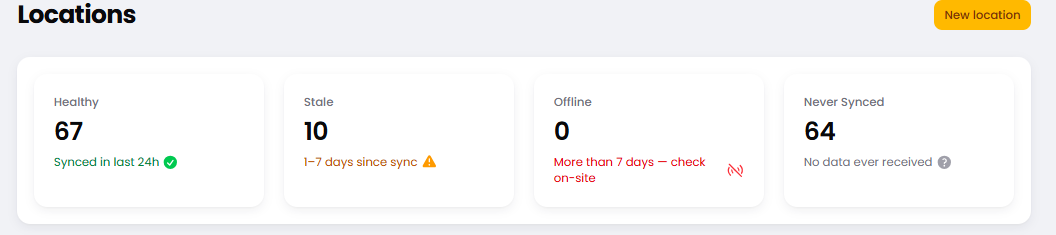
Dashboard Health Checks: Your Location list now displays real-time health and "Last Sync" times so you can ensure your tablets are online at a glance.
Under the Hood In addition to the visual changes, we shipped dozens of backend security updates, closed workflow loopholes, and added over 100 new automated tests to ensure the platform remains bulletproof as we scale.
Log in today to experience the faster, smoother workflow. As always, if you have any feedback or spot anything out of place, please let us know!